The Image Pop Formula: How to Make Aircraft Stand Out in Lightroom Without Over-Processing
May 18, 2026
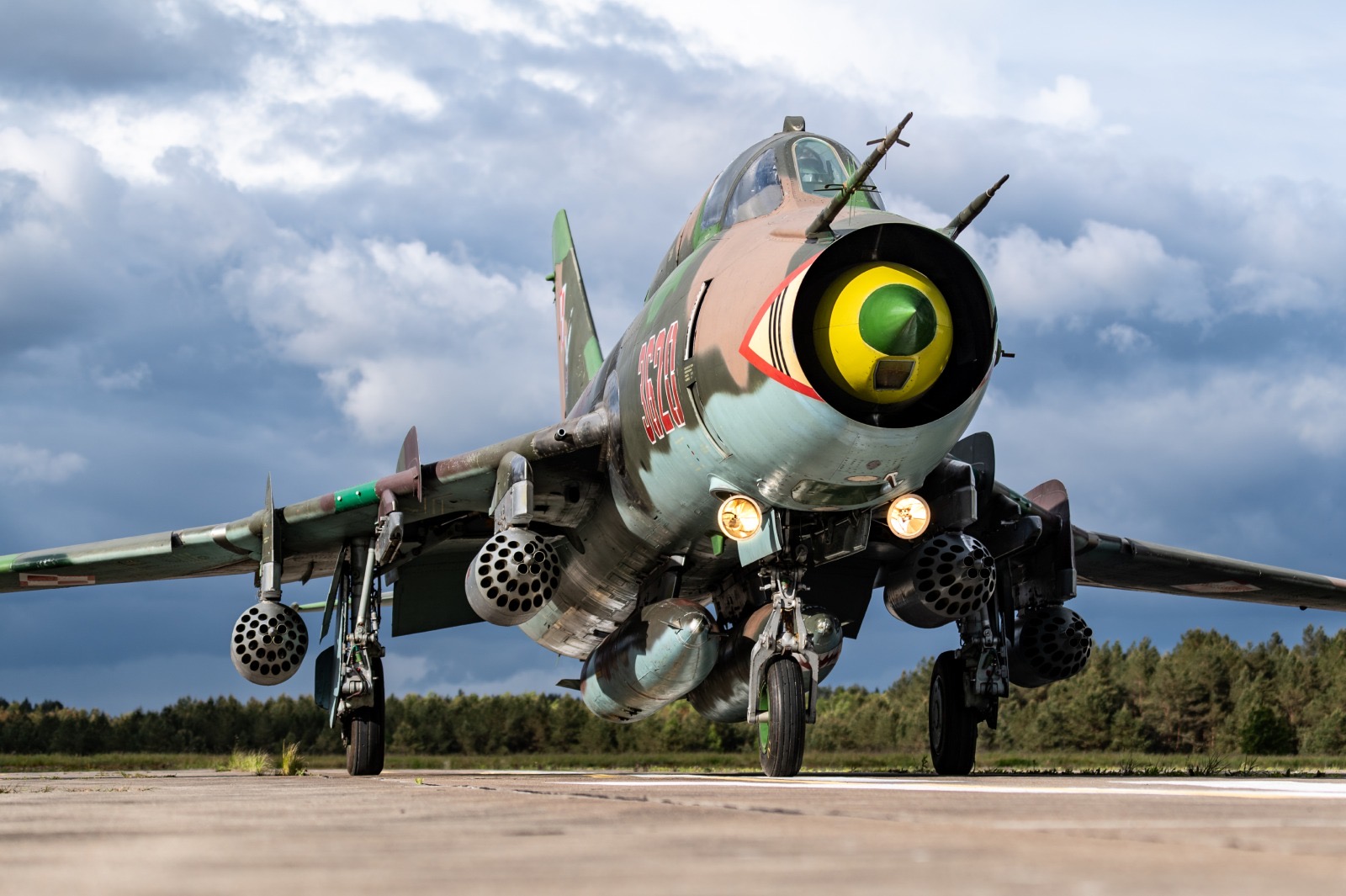
Aviation images often need separation. The aircraft needs to stand out from the sky, cloud, haze or distant background without looking cut out, over-sharpened or artificial.
That is where a lot of edits can start to go wrong.
It is very tempting to push Contrast, Clarity and Dehaze until the jet feels punchier. At first glance, it can work. The aircraft looks stronger, the sky gets darker, and the image has more impact. The problem usually appears around the edges, and these need careful attention. Wings start to glow, clouds become gritty, and fine details around pylons, tails and aerials begin to look too harsh.
A cleaner approach is to build an image ‘pop’ in stages.
Start with the goal
Before touching the sliders, decide what the image needs. A grey jet in flat cloud might need clean separation and a little extra depth. A backlit jet might suit a darker, moodier edit as it might already be half-way there. A bright blue-sky airshow shot may only need crisp tone and careful colour.
There is no single correct version. The goal simply stops the edit drifting into random slider pushing.
Build ‘pop’ through tone first
Start with the four tonal controls that do most of the heavy lifting: Highlights, Shadows, Whites and Blacks.
Highlights protect the bright areas that can break a jet edit quickly, especially canopy reflections, leading edges, light liveries/schemes, tanks, missiles and bright cloud close to the aircraft.
Shadows bring back useful underside detail, but they need restraint. Opening every dark area can make the jet look flat and bring in noise - the underside still needs shape.
Whites set the clean top end of the file. Blacks add weight and stop the aircraft feeling washed out. Used together, they create a stronger tonal range without needing a heavy global contrast move.
Use masks for real separation
Once the base tone is working, use masking to separate the subject from the background.
A Subject mask can give the aircraft a small lift in presence. This might be a slight Exposure increase, a touch of Contrast, or a little Texture where the airframe warrants it. Small moves are usually enough.
A Sky mask or background mask can then adjust the area around the aircraft. Slightly darkening the sky or softening a bright cloud bank often makes the jet stand forward more naturally than pushing the aircraft harder.
Check the aircraft edge
Before exporting, zoom in around the outline of the aircraft. Look at the wing leading edges, tailplane, canopy line, pylons, stores and antennae.
If you can see a halo, reduce local contrast or soften the mask and check your sharpening settings. If the sky looks gritty, back off Clarity, Texture or Dehaze. If the aircraft looks pasted onto the background, the separation is too heavy.
The best edits feel strong, clean and natural - yet have that punchy impact without feeling overdone. The aircraft leads the image, but the edit does not shout louder than the subject.
If you want to go further, COAP Online goes deeper into Lightroom aircraft separation, including Subject masks, Sky masks, highlight control, grey aircraft, fast jet contrast and avoiding halos. The Merge post drills into a repeatable Jet Pop Formula with practical slider ranges and a step-by-step Lightroom workflow for members. Explore COAP Online with a free trial at www.coaponline.com.
Did you know our blogs are written exclusively by photographers inside the Accelerator? We'd love for you to come and see what COAP Online is all about.
Not yet part of the Aviation Photography Accelerator?
Start this month for £19
Every month the whole community locks onto one Focus Subject and learns it live with our pro instructors. You also get instant access to everything we have ever made: 30+ workshop replays, 150+ tutorials, four pro masterclasses, and The Merge, our private community of 500+ aviation photographers.
Cancel any time. 30-day money-back guarantee.

Included with the Accelerator
Exclusive gear discounts at Clifton Cameras
Everyone inside the Accelerator qualifies for exclusive pricing on cameras, lenses and accessories through our retail partner, Clifton Cameras. The saving on a single purchase can cover several months of the Accelerator.
Discounts available across









Get a free tutorial to your inbox every week!
Subscribe to our mailing list to receive a fantastic aviation photography tutorial to your inbox every Tuesday!
We hate spam as much as you. We will never sell your information, for any reason.